
Best Accounting Software: QuickBooks vs Xero
Almost all companies need to carry out basic tasks such as invoicing, paying wages, dealing with payments, and building accounting reports. Accounting software makes performing these functions easy and efficient. There is, however, a lot of software that does just that! To help make the choices easier for you, we narrowed down the list to two of the best options.
Summary
- Both target SMBs with nearly identical core features - Cloud-based platforms offering mobile apps, top security, standard reports, customizable chart of accounts, automated bank feeds, and import/export capabilities. The differentiator is how well each executes these features
- QuickBooks dominates with reliability and reporting - Company-owned bank feed service downloads transactions automatically, invoice automation sends on future dates with custom forms and fields, beautiful easy-to-understand reports. Drawback: best features locked in expensive “Plus” version (though still half Xero’s premium price)
- Xero excels at customization and continuous improvement - Free updates every 3-6 weeks, all robust features available in every plan with unlimited users, built-in invoice/bill approval workflow eliminates need for extra software, fine-tuned banking control categorizes transactions into organized spreadsheets, contact groups and customer-specific templates automate invoicing
- Pick based on priorities, not popularity - QuickBooks wins if you need clean intuitive reports and familiar software most employees already know. Xero wins if you prioritize custom invoicing, subscription/rental billing automation, and constantly improving features. Free QuickBooks conversion tool makes switching painless. See how Tallyfy manages business workflows
Almost all companies need to carry out basic tasks such as invoicing, paying wages, dealing with payments, and building accounting reports. Accounting software makes performing these functions easy and efficient. There is, however, a lot of software that does just that! To help make the choices easier for you, we narrowed down the list to two of the best options - QuickBooks vs Xero - and analyzed them based on their pros and cons.
QuickBooks vs Xero: Common Features
The two companies are close competitors - they both provide a similar set of features aimed at the same audience -small and medium-sized businesses. Both tools cover all the basics of your accounting needs, from payroll to invoicing. In addition, the two share the following similarities:
- Cloud-based
- Easy to use
- Available as iPhone/iPad and Android apps
- Top level security
- Complete set of standard reports
- Customizable chart of accounts (COA)
- Automated bank feeds
- Ability to import/export files
While both tools offer a lot of the same features, the main differentiator is how well each company does these features. So, let’s take a look at what makes each accounting software unique.
QuickBooks
 QuickBooks’ Pros
- Apps for Windows and Mac computers
- More widely used
- Company-owned bank feed service
- Invoice automation
- Custom forms and fields
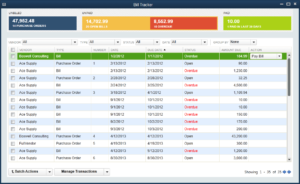
- Easy and beautiful reports
QuickBooks’ Cons
- Must pay for “Plus” version to access many features
- Cannot use or create credits/deposits
- Customers can only view one invoice at a time
- No free trial
QuickBooks Feature Review
QuickBooks has dominated the accounting software market for years. It’s intuitive and reliable.
One of QuickBooks’ best features is its own bank feed service. It allows you to easily connect to your bank to download transactions and use other online banking services. The bank feed will record these transactions for you so that you can focus on more important tasks.
When creating invoices, there are many options for automation. You can choose when to send invoices on future dates and set up automated emails for when invoices are sent.
You can also create custom forms with custom fields. You can create multiple different forms to invoice different types of clients.
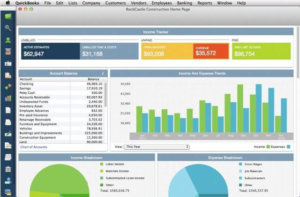
Another feature QuickBooks excels in is report generation - they’re easy to understand & beautifully designed.
Most of the best features of QuickBooks, however, is only available in the most expensive version. On the bright side, it’s still half the price of Xero’s premium version.
QuickBooks’ Pricing

Who is QuickBooks for?
As mentioned previously, QuickBooks and Xero are marketed toward practically the same type of client. It’s ideal for small to medium-sized businesses looking for a reliable accounting software.
In fact, there’s a good chance that most of your employees - new or old - have had some experience with the software due to its popularity. It’s also fast, easy to learn, and relatively inexpensive.
Xero
 Xero’s Pros
- Frequent software updates
- Majority of features available in all plans
- Approval process for invoices and bills
- Free QuickBooks conversion tool
- More control over banking
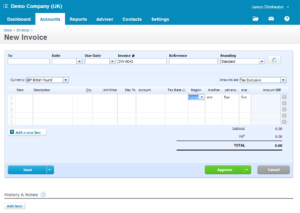
- More customization options for invoices
Xero’s Cons
- Reports are not as straightforward as Quickbooks’
- Lack of customization of reports
- Below average customer service
Xero Feature Review
Xero has not been around for nearly as long as QuickBooks, and accordingly, is not as popular. The platform, however, is very high-tech and ever-updating, with new, free updates coming out every 3-6 weeks.
The software is also very budget-friendly - you don’t have to get the most expensive plan to get all the robust features. In fact, it even offers an unlimited number of users for every one of the plans.
Unlike QuickBooks, you can actually get bills and invoices approved within Xero’s app with a built-in workflow. This takes away the need for even more software/apps.
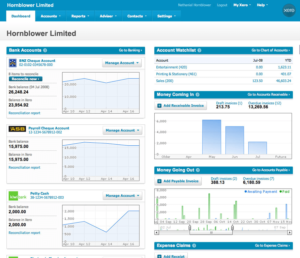
In addition, the software has fine-tuned control over banking functionality. It’ll do a better job of categorizing your transactions and even put them in an organized spreadsheet.
While QuickBooks dominates reporting, Xero excels in the customization of invoices. You can create contact groups to fire off invoices more efficiently. You can also create and assign specific templates to specific people so that email and invoice templates are automatically provided for each customer.
If you are currently using QuickBooks and are looking to switch to Xero, you can simply just use the conversion tool - this takes all of your data from one software and transfers it to the other effortlessly.
Xero’s Pricing
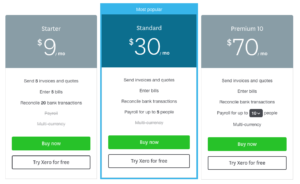
Who is Xero for?
As we’ve mentioned before, both software is aimed at SMBs. Xero specifically works better with companies that offer subscriptions, rentals or memberships, as the software can automatically perform tasks at set time intervals.
Their proactive development schedule also ensures that your software will be consistently improving and staying up-to-date. In fact, Xero has quickly become a fierce competitor to QuickBooks after much less time in the industry.
QuickBooks vs Xero: The Final Verdict
QuickBooks vs Xero come head-to-head when it comes to the best accounting software for SMBs. They share a majority of their features, making the decision between the two difficult.
However, it is important to remember that there is not one winner for everyone, so when making your decision take your company’s individual needs into consideration.
Why Pick QuickBooks
QuickBooks is the always-reliable option for accounting software. Almost everyone in business has or still uses it.
The software most dramatically beats out Xero when it comes to reporting, so if your focus is on clean and intuitive reports, then QuickBooks may be the better option for you.
Why Pick Xero
Xero is a relatively new but fierce competitor. If you value an accounting software that’s consistently updating to give you the best features in the market, then Xero is a no-brainer.
Xero’s most distinctive feature, when paralleled with QuickBooks, is its invoice customization. If you find yourself prioritizing automatic and custom invoices over beautiful reports, Xero might be the one for you.
Hopefully, we managed to help you decide which accounting software is the best for your business. If not, you can always give both a try yourself!
Featured image by Freepik QuickBooks and Xero are trademarks of their respective owners.
About the Author
Amit is the CEO of Tallyfy. He is a workflow expert and specializes in process automation and the next generation of business process management in the post-flowchart age. He has decades of consulting experience in task and workflow automation, continuous improvement (all the flavors) and AI-driven workflows for small and large companies. Amit did a Computer Science degree at the University of Bath and moved from the UK to St. Louis, MO in 2014. He loves watching American robins and their nesting behaviors!